Every business buys things. Raw materials, packaging, equipment, software, transport, repairs, office supplies, professional services. For most companies, this external spending is one of the largest costs on the books, often larger than payroll, yet it’s usually managed with far less structure than money going out through salaries or taxes. That’s why so many growing companies are adopting procurement software such as APSentra to bring every purchase into one controlled, transparent system instead of scattering it across emails, spreadsheets, and personal supplier contacts.
If you’ve never looked closely at this category of software before, this guide explains what it actually does, how it works step by step, who needs it, what to look for, and how APSentra fits in.
What Is Procurement Software?
Procurement software is a system that manages the entire process of buying goods and services for a company, from the moment someone decides they need something to the moment the supplier is paid.
It’s easy to confuse it with accounting software, but the two do different jobs:
Accounting software | Procurement software |
Records financial transactions after they happen | Manages purchasing decisions before money is committed |
Tracks invoices and payments | Tracks requests, approvals, budgets, suppliers, tenders, contracts, orders, and invoices |
Answers “what did we spend?” | Answers “what are we about to spend, with whom, at what price, and who approved it?” |
In short, accounting tells you the history. Procurement software helps you control the future.
The problem it solves
In most growing companies, purchasing happens like this: someone emails a request, a manager replies “OK,” an order goes to a familiar supplier, the invoice arrives weeks later, and a line is added to a spreadsheet. It works until the company gets bigger. Then:
Approvals disappear into inboxes
Nobody knows which spreadsheet version is current
Different departments or branches buy the same thing at different prices
Budgets are checked only after money has been spent
Duplicate orders and double payments slip through
Supplier contracts, certificates, and price lists are scattered across personal files
Nobody can answer simple questions like “how much did we spend on packaging last year?”
Procurement software replaces that patchwork with one shared system that everyone works in.
How Procurement Software Works: The Source-to-Pay Cycle
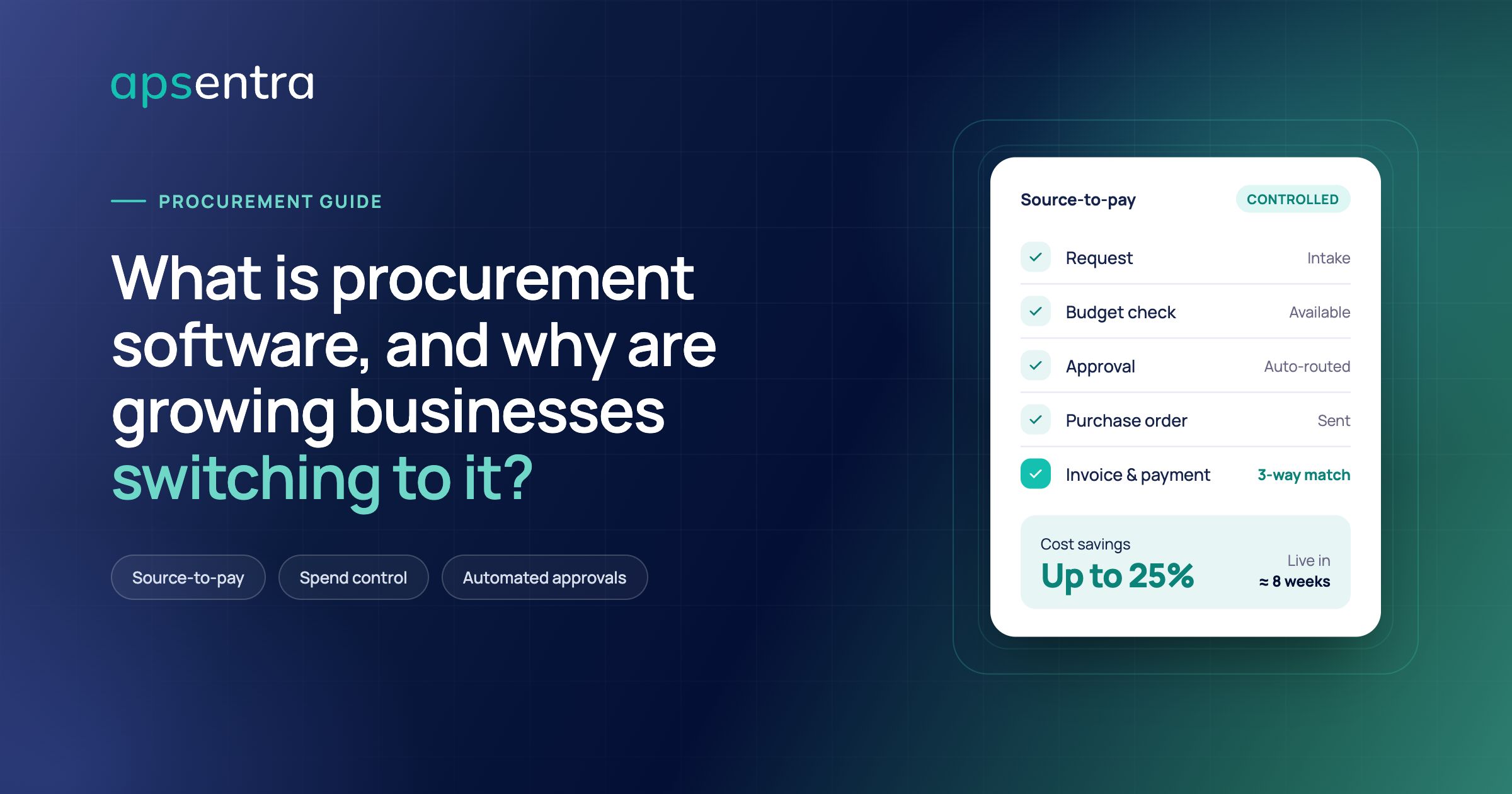
Modern platforms cover what the industry calls source-to-pay, the complete journey of a purchase. Here’s what each stage means in everyday language.
1. Request (intake)
An employee needs something, so they raise a request in the system instead of sending an email. They describe what they need, when, and why, and the system guides them towards approved suppliers and already-contracted items.
2. Budget check
Before anyone approves anything, the system checks whether the department, project, or site actually has budget available, including money already committed to other orders that haven’t been invoiced yet.
3. Approval
The request is routed automatically to the right approvers based on rules you define: the amount, the category, the department, the location, or the legal entity. Everyone sees the status, and every decision is recorded.
4. Sourcing
For larger purchases, the system helps you compare suppliers properly. That might mean collecting quotes, running a tender or RFP, or holding an online auction where suppliers compete. Offers are compared side by side on price, quality, delivery terms, and total cost, not just the headline number.
5. Contracting
The agreed terms are stored centrally, with key dates and conditions tracked, so the company actually buys at the prices it negotiated instead of losing those savings through careless ordering.
6. Purchase order
An official order goes to the supplier, with quantities, prices, and delivery terms recorded in the system.
7. Receiving
When goods or services arrive, they’re recorded against the order, so the company knows exactly what was delivered.
8. Invoice and payment
The supplier’s invoice is captured automatically (usually by scanning technology that reads the document), then matched against the purchase order and the delivery record. If all three agree, the invoice goes for payment. If they don’t, it’s flagged before any money leaves the business.
9. Analytics
Every step produces data. Dashboards show spending by category, supplier, department, and site in real time, so management can spot savings opportunities and problems early.
Why Growing Businesses Are Switching
1. Real cost savings
When purchases are visible and suppliers compete openly, prices fall. Companies also stop paying different prices at different locations, capture volume discounts, and avoid duplicate purchases.
2. Control before money is spent
The biggest advantage over spreadsheets is timing. Budget and policy checks happen before an order is placed, not when the invoice lands weeks later.
3. Faster purchasing
Automated routing removes the back-and-forth of chasing approvals, so urgent purchases don’t wait days for a reply.
4. Fewer errors
Automatic invoice capture and matching dramatically reduce typing mistakes, duplicate payments, and overbilling, all of which quietly drain cash in manual processes.
5. Transparency and trust
Every request, approval, and supplier decision is logged. That protects the business against favouritism and fraud, and makes audits far less painful.
6. Better supplier relationships
Centralized supplier records, clear terms, and reliable payment processes make a company easier to work with, which often translates into better pricing and service.
7. Scalability
As the business adds staff, branches, or new legal entities, the same rules apply automatically. There’s no need to rebuild processes every time the company grows.
Who Needs Procurement Software?
It isn’t only for giant corporations. The real trigger is complexity, not size. Consider it if you:
Operate from more than one location, branch, or legal entity
Work with dozens of suppliers or more
Have several people who can request or approve purchases
Buy materials or services that make up a large share of your costs
Struggle to answer basic questions about spending
Are preparing for audits, investment, or rapid growth
Typical users include manufacturers, food and agricultural businesses, retail and FMCG companies, restaurant and pharmacy chains, construction and engineering firms, distributors, logistics operators, financial institutions, telecom, and utilities.
How to Choose a Procurement Platform
When comparing options, these questions matter most:
Does it cover the whole cycle? Some tools handle only one part, such as invoices or supplier records. A unified source-to-pay platform avoids new silos.
Will it connect to your existing systems? You shouldn’t need to replace your ERP or accounting software to improve purchasing.
Can it match your rules? Your approval chains, budget structure, and company hierarchy are unique. The system should adapt to them.
Is it easy for ordinary employees? Most people raising requests aren’t purchasing specialists.
Does it handle multiple companies and locations? Important for groups and fast-growing businesses.
How quickly can it go live? Long implementations delay savings.
What support comes with it? Software alone rarely changes habits; training and expert guidance matter.
How APSentra Helps
APSentra is an AI-driven source-to-pay procurement platform built for company-wide spend control. It’s designed to replace Excel, email approval chains, and disconnected tools with one system covering sourcing, purchasing, contracts, suppliers, payments, and analytics, and it’s built to handle complex, multi-company operations.
What the platform covers
Budget planning and spend control: real-time budget validation, commitment tracking, and separate governance for operating costs and capital investments.
Intelligent intake and approvals: guided buying that steers employees towards approved suppliers, consolidated demand to prevent duplicate orders, and configurable approval workflows.
Strategic sourcing: digital tenders, RFPs, and online auctions with multi-criteria evaluation based on price, quality, delivery terms, and total cost of ownership.
Contract lifecycle management: AI-assisted extraction of key contract terms, ongoing monitoring, and prevention of value leakage.
Procure-to-pay automation: 3-way matching of orders, deliveries, and invoices, plus AI-powered OCR invoice scanning and accounts payable automation.
Supplier management: onboarding, performance tracking, and ESG and third-party risk visibility.
Unified analytics: real-time dashboards and KPIs, from basic reporting to predictive and prescriptive insights, with an AI assistant that can analyze spending and surface opportunities.
Built for multi-company groups
One of APSentra’s distinguishing features is its digital twin: a live digital model of your actual company structure and purchasing rules. Whether procurement is centralized at head office, handled locally by each site, or a mix of both, every transaction follows the right policy. Growing groups can add entities and locations without rebuilding their processes.
Works with the systems you already use
APSentra is ERP-agnostic. It integrates with SAP, SAP Business One, Oracle, Microsoft Dynamics 365 Business Central and Dynamics NAV, NetSuite, QuickBooks, Odoo, Microsoft Power BI, Slack, Amazon Business, single sign-on, custom APIs, and databases, so you keep your existing core software.
Security and compliance
APSentra includes automated policy enforcement, complete audit trails, role-based access control, and real-time compliance dashboards, backed by an anti-corruption and security architecture and independent security testing.
APSentra by the Numbers
APSentra is trusted by more than 130 enterprise clients across agriculture, manufacturing, retail and FMCG, construction, financial services, and telecom and utilities.
Metric | Result |
Procurement requests processed | 2,050,000+ |
Purchase orders executed | 443,560 |
Active contracts managed | 126,200 |
Suppliers and counterparties connected | 120,000+ |
Tenders conducted | 386,400 |
Auctions managed | 265,700 |
Total procurement volume managed | ≈ $129 billion |
Verified savings generated | ≈ $16 billion |
Customer satisfaction | 94% |
According to APSentra, companies using the platform typically achieve up to 25% cost savings, up to 80% faster procurement processes, and 100% transparency and control over purchasing.
Its customer cases include Bunge, which aligned more than 200 procurement and operations users across regions, a restaurant chain with over 100 locations, a fashion retail group, a pharmaceutical distributor, and an agribusiness that has run 100% of its procurement through APSentra for more than ten years.
Live in About 8 Weeks
A common worry about business software is the length and disruption of implementation. APSentra follows a structured timeline of roughly eight weeks:
Consulting (1 week): review current processes, define goals and KPIs, and estimate savings potential.
Implementation and automation (3 weeks): configure the platform and launch workflows.
Integration (3 weeks): connect to ERP, accounting, and analytics systems.
Learning (1 week): train teams through certified courses and practical use cases.
Control and optimization (ongoing): monitor KPIs and keep improving.
Alongside the software, the APSentra team provides procurement audits, consulting, benchmarking, and change management support, which helps new processes stick rather than fading after launch.
Getting Started: A Simple First Step
You don’t need to transform everything at once. A practical starting point:
Measure your external spend. Add up everything paid to suppliers in the last year.
List your top 20 suppliers. These usually account for most of the spend and offer the biggest savings potential.
Check your process. How long does an approval take? Can anyone order without sign-off?
Find the leaks. Look for duplicate payments, off-contract buying, and price differences between locations.
Pick one area to fix first, such as approvals and budget control, then expand.
Final Thoughts
For a growing company, purchasing is too important to run on habit and inboxes. Every supplier decision affects costs, cash flow, quality, and risk, and the bigger the business gets, the harder those decisions are to see.
Procurement software brings all of it into one place: requests, approvals, budgets, suppliers, tenders, contracts, invoices, and analytics. Instead of discovering problems in the monthly report, you prevent them at the moment someone decides to buy something.
APSentra offers that control in a single AI-driven platform, typically live in about eight weeks and integrated with the systems you already use. If you’d like to see what it could mean for your business, APSentra provides a free demo and a savings calculator on its website.
Frequently Asked Questions
What is procurement software in simple terms?
It’s a system that manages company purchasing from request to payment, covering approvals, budgets, suppliers, contracts, orders, and invoices in one place instead of spreadsheets and email.
How is it different from accounting software?
Accounting software records transactions after they happen. Procurement software controls purchases before money is committed, then passes the approved data to accounting.
Is procurement software only for large companies?
No. Complexity matters more than size. Businesses with several locations, many suppliers, or multiple approvers usually benefit, regardless of headcount.
Do we need to replace our ERP system?
Not with an ERP-agnostic platform. APSentra integrates with systems such as SAP, Oracle, Microsoft Dynamics, NetSuite, QuickBooks, and Odoo.
How much can a company save?
Savings depend on your industry and current processes. APSentra reports that customers typically achieve up to 25% cost savings, and the platform has generated around $16 billion in verified savings across roughly $129 billion of managed procurement volume.
How long does implementation take?
APSentra’s standard rollout takes about eight weeks, including consulting, configuration, integration, and training.